
Setting up your desk the right way can make a huge difference in how you feel during the day. A proper Ergonomic Desk Setup isn’t just for fancy offices; it’s for anyone who spends long hours at a computer. When your workspace is organized and comfortable, you’ll feel energized and more productive.
First things first, your chair should support you well. Look for one that has adjustable height and lumbar support. You want your feet flat on the floor and your knees at about a 90-degree angle. This simple adjustment can help prevent that pesky back pain that creeps up after hours of sitting.
Next, let’s talk about your desk and monitor. Your screen should be at eye level. If you have to tilt your head to see it, you’re setting yourself up for neck pain later on. A monitor stand can help. Keep your keyboard and mouse close, too. Your arms should rest comfortably at your sides while you type. This setup reduces strain on your wrists and arms.
Don't forget about lighting! Good lighting helps reduce eye strain. Try to use natural light as much as possible. If that’s not an option, a desk lamp with adjustable brightness can really help. Keep your workspace tidy, too. A messy desk can be distracting and make it hard to focus.
By taking the time to create an efficient Ergonomic Desk Setup, you’ll find yourself feeling happier and more focused. Small changes can lead to big improvements in your daily routine. So, roll up your sleeves and get your desk in shape!
Choose the Right Chair for Comfort
Choosing the right chair is super important for your Ergonomic Desk Setup. A good chair keeps your back happy and helps you focus. You don’t want to be fidgeting around or feeling sore after a long day of work. So, let’s dive into what to look for when picking out the perfect chair.
First off, go for a chair with adjustable height. This makes it easy to find a position that suits your body. Your feet should sit flat on the ground, and your knees should be at hip level. That’s how you get the most comfort and support while you work.
Next up, check out the back support. A chair with lumbar support can make a huge difference. It helps keep your spine in a healthy position, which is key when you’re sitting for hours. Look for something that can be adjusted to fit the curve of your back perfectly.
Don’t forget about the seat padding! A cushy seat keeps you comfy, but make sure it’s not too soft. You want enough support to keep you sitting upright without sinking in too much. Also, consider the chair’s width and depth to match your body size.
Finally, think about the armrests. Having adjustable armrests is a game-changer. They support your arms and take some strain off your shoulders, especially if you’re typing a lot. Just remember, proper positioning helps in achieving that ultimate Ergonomic Desk Setup you’re aiming for!

Logitech Wireless Ergonomic Keyboard & Mouse Set
Reduce Strain and Boost Productivity with the Logitech Wireless Ergonomic Keyboard and Mouse Set
Product information
$57.32
Product Review Score
4.53 out of 5 stars
15 reviewsProduct links
Organize Your Workspace for Success
When it comes to your Ergonomic Desk Setup, organization plays a huge role in your overall comfort and productivity. A cluttered space can lead to distractions and stress, making it hard to focus on your work. Start by clearing off your desk. Only keep what you really need, like your computer, your planner, and maybe a plant for some life. It’s amazing how a clean slate can help you think clearer.
Next, think about how your items are arranged. Your monitor should be at eye level so you’re not straining your neck. If you’re using a laptop, consider a stand to elevate it. Place your keyboard and mouse within easy reach; you shouldn’t be stretching or awkwardly positioning your arms. Everything should feel natural and comfortable to access.
Also, consider adding some small storage solutions like drawer organizers or a desktop file holder. These keep your supplies neat and within reach. Baskets can also make a cute and functional way to hold any extras like chargers or notebooks. A tidy space is not just pleasing to the eye; it also sets the tone for how well you work.
Lastly, don’t overlook your lighting. A well-lit workspace can help prevent eye strain. Make sure you have enough light on your desk without glare on your screen. If possible, use adjustable lighting to create a cozy atmosphere whenever you need to dive deep into a project. With a little thought and effort, you can transform your area into a workspace that makes your Ergonomic Desk Setup inviting and efficient.
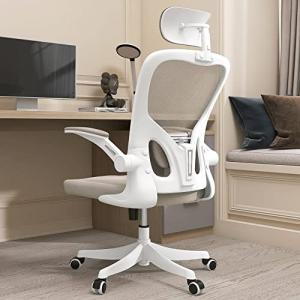
Ergonomic High Back Office Chair with Lumbar Support
Transform Your Workspace with Our Ergonomic High Back Office Chair and Say Goodbye to Discomfort
Product information
$129.99 $95.47
Product Review Score
4.74 out of 5 stars
191 reviewsProduct links
Adjust Your Monitor for Eye Relief
Getting your monitor at the right height is super important for eye comfort, especially when you’re working for hours at a time. An ergonomic desk setup should make you feel good, not tired or strained. Start by adjusting the height of your monitor so your eyes are level with the top of the screen. This way, you won’t have to strain your neck looking up or down.
If you’re using a laptop, consider getting a laptop stand or even a few books to raise it. You can also use an external keyboard and mouse, which lets you keep your screen at eye level while your hands stay comfortable on the desk. Trust me, this little change can make a big difference in how you feel at work.
Think about the distance too. Your monitor should be about an arm's length away from your eyes. If it’s too close or too far, that can really wear you out. A good way to check is to sit back in your chair, extend your arm, and see if your fingertips touch the screen. If they do, it’s time to move that monitor a bit.
Lastly, don’t forget to take breaks! Staring at screens all day can lead to eye fatigue, so make sure to follow the 20-20-20 rule. Every 20 minutes, look at something 20 feet away for at least 20 seconds. It’s a simple habit that’s easy to forget but essential for maintaining a comfy ergonomic desk setup.



