
Choosing the right desk height is super important for your ergonomic desk setup. When your desk is at the right level, you can work comfortably and avoid those pesky aches and pains. Let's dive into how to figure out what works best for you!
The ideal desk height usually depends on your height and the type of chair you use. A good rule of thumb is to set your desk so your elbows are at a 90-degree angle when you're sitting down. This way, your wrists stay straight while typing. If your desk doesn’t adjust, you might want to consider a keyboard and mouse tray that can bring everything to a more comfortable level.
If you’re on the taller side, look for desks that allow you to raise everything a bit higher. On the flip side, shorter folks should seek out desks that can lower enough so that you don’t feel like you’re reaching up all the time. A standing desk option can also be a game-changer, letting you switch between sitting and standing as you please.
Lastly, make sure to assess your workspace. If you have a lot of clutter or if your monitor is too high or low, it could affect your overall ergonomic desk setup. Clear out anything unnecessary, and adjust your monitor to eye level. Trust me, your body will thank you for it!
Select an Ergonomic Chair
Choosing the right ergonomic chair is a game changer for your ergonomic desk setup. A good chair supports your body, promotes better posture, and can make long hours at your desk way more comfortable. With so many options out there, it can feel a bit overwhelming. Let’s break it down.
Look for a chair that fits your height and body type. If it’s too tall or too short, you might end up slouching or straining your neck. Adjustable features are key. You want to easily change the height, armrest position, and lumbar support to fit your needs. A chair with breathable fabric can help keep you cool during those busy workdays.
Don’t forget about mobility. A chair with good wheels makes moving around your workspace a breeze. Whether you’re reaching for something or need to shift to a different area, smooth-rolling wheels save you from feeling like you’re stuck in one place.
Finally, consider the style. Your ergonomic chair doesn’t just have to be functional; it can also look great in your office. Whether you prefer a modern look or something more classic, there are plenty of options out there that won't cramp your style while enhancing your ergonomic desk setup.

Delux M800 PRO White Wireless Ergonomic Gaming Mouse
Experience ultimate comfort and precision for long gaming sessions with this sleek and responsive wireless mouse
Product information
Product Review Score
4.21 out of 5 stars
155 reviewsProduct links
Arrange Your Monitor Position
Getting your monitor position right is super important for an Ergonomic Desk Setup. When your screen is at the right height and distance, it can make a world of difference for your comfort. No more straining your neck or squinting at the screen all day!
Start by adjusting the height of your monitor. Your eyes should be level with the top of the screen or slightly below it. If you have to look up or down too much, you’ll end up with a sore neck. A monitor stand can do wonders here. You can also stack some books or use a sturdy box if you're looking for a quick fix.
Next, think about the distance. Ideally, you want your monitor about an arm's length away. This helps reduce eye strain and keeps you from leaning in uncomfortably. Make sure the screen isn’t too bright, either. A little adjustment in brightness can help your eyes feel more relaxed.
Finally, angle your monitor slightly backward. A tilt of about 10 to 20 degrees can reduce glare and make viewing way easier on your eyes. Once you’ve set everything up, take a moment to sit back, relax, and see how it feels. Adjust as needed. A well-positioned monitor is a key part of your perfect Ergonomic Desk Setup!
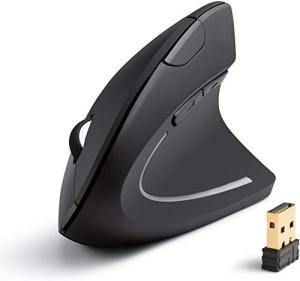
Anker Wireless Vertical Ergonomic Optical Mouse
Experience comfortable clicking and smoother navigation for your work or gaming setup
Product information
$25.00
Product Review Score
4.68 out of 5 stars
128 reviewsProduct links
Optimize Your Keyboard and Mouse
When it comes to your Ergonomic Desk Setup, optimizing your keyboard and mouse is a game-changer. You’ll be amazed at how a few adjustments can make a big difference in your comfort and productivity. Let's dive into some quick tips!
First off, positioning is key. Your keyboard should sit at a height that keeps your elbows at about a 90-degree angle. If your wrists are bent while typing, you're setting yourself up for discomfort. Try using a wrist rest to keep everything aligned and cozy. As for the mouse, it should be close to your keyboard to minimize stretching. These little tweaks can help you avoid those pesky aches!
Next, consider the types of devices you're using. An ergonomic keyboard with a split design can take pressure off your wrists. Plus, a vertical mouse encourages a natural grip, reducing strain. Trust me, these aren’t just fancy words; they really make a difference in day-to-day use.
And don't forget about regular breaks! The best Ergonomic Desk Setup isn’t just about gear. Make it a habit to stand up, stretch, or walk around every hour. This improves blood flow and helps your mind stay sharp. You’ll feel more energized and ready to tackle your tasks!



