
Finding the right desk and chair combo is key to nailing your ergonomic desk setup. You want a workspace that keeps you comfortable and productive. A good desk should let you work at your ideal height. Look for adjustable desks that can convert from sitting to standing. This flexibility is a game-changer for your back and overall health.
When it comes to chairs, you need one that supports your posture. Look for options with adjustable height, lumbar support, and armrests. A chair that fits your body will help you avoid that pesky back pain. Don't forget to check if the chair lets you sit all the way back with your feet flat on the floor. That’s how you know you’ve found a winner!
Take a moment to think about your workspace vibe, too. Do you prefer a minimalist look, or do you love color? Your desk and chair can reflect your personality. Plus, a space you enjoy staring at can boost your motivation. Browse different styles, and don't rush your decision. Your ergonomic desk setup should make you excited to sit down and get to work!
Lastly, consider the accessories that can complement your desk and chair. Items like a footrest or a keyboard tray can improve your position, too. These little adjustments can make a big difference in your comfort levels. Your desk setup is not complete until you feel just right!
Adjust Your Monitor Height Properly
Getting your monitor height right is a game changer for your ergonomic desk setup. If your screen is too high or too low, you might find yourself straining your neck and eyes, leading to discomfort. Let's keep that from happening!
First of all, your monitor should be at eye level. This way, you can keep your neck straight and avoid leaning forward or tilting back. A good rule of thumb is to position the top of the screen at or slightly below eye level when you’re sitting comfortably. You can use a monitor stand or even some sturdy books to raise it up if needed.
Next, you want to make sure your monitor is about an arm's length away. This distance helps reduce eye strain and keeps you from squinting. If you find yourself leaning in closer or backing away, adjust the distance until it feels just right. Your eyes should naturally land on the middle of the screen without having to move your head too much.
Finally, if you're working on more than one screen, make sure they’re all aligned. You don’t want to constantly turn your head from side to side. Keeping your monitors at the same height and in a straight line helps reduce strain. This little adjustment can make your ergonomic desk setup even better.

Ergonomic Wrist Rests for Office and Gaming
Relieve Wrist Pain and Improve Comfort with our Ergonomic Wrist Rests for Office and Gaming
Product information
Product Review Score
4.21 out of 5 stars
45 reviewsProduct links
Keep Your Keyboard and Mouse Close
Keeping your keyboard and mouse close is a game changer for your Ergonomic Desk Setup. When they’re within easy reach, you can maintain a relaxed posture without straining your arms or shoulders. This small adjustment can make a big difference, especially during long work hours.
Position your keyboard so that your elbows are bent at about 90 degrees. Your wrists should be straight, and your hands should hover just above the keys. A keyboard tray can help you achieve this ideal height, so consider adding one if your desk doesn’t allow for easy adjustments.
Your mouse should sit right next to your keyboard, so you don’t have to stretch out awkwardly to grab it. A mouse pad with wrist support can boost your comfort too. It helps keep your wrist in a neutral position, reducing strain as you click and scroll.
Don’t forget about the space around your workspace. Keep your desk clutter-free to allow for smooth movements between your keyboard and mouse. This helps you stay focused and prevents unnecessary interruptions that can come from searching for items lost in the mess.
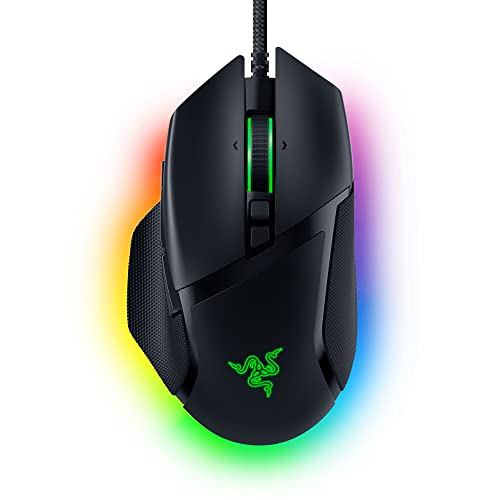
Razer Basilisk V3 Custom Ergonomic Gaming Mouse
Experience ultimate comfort and precision during your gaming sessions with this customizable ergonomic mouse
Product information
$25.00
Product Review Score
4.64 out of 5 stars
64 reviewsProduct links
Add Supportive Accessories for Comfort
When you’re building an ergonomic desk setup, don’t overlook the accessories that can make your workspace even more comfortable. Small changes can lead to big improvements in how you feel during and after work hours. Let’s dive into some supportive accessories you should consider.
First up, wrist rests. Whether you’re typing away or using a mouse, having a soft wrist rest can keep your wrists in a natural position. Look for ones made of memory foam or gel for that extra bit of comfort. They help to reduce strain, especially during long hours in front of the computer.
Next, footrests are a game changer. A good footrest allows you to keep your feet flat and your legs at a comfortable angle. This can help improve circulation and reduce fatigue. Some footrests even come with adjustable heights, so you can find that perfect spot for your feet to relax.
Don't forget about screen stands! An adjustable monitor stand can help you align your computer screen to eye level, reducing neck strain. It’s one of those simple upgrades that makes your ergonomic desk setup way better. You’ll be amazed at how much more comfortable staring at a screen can be when it’s at the right height.
Lastly, consider a good chair cushion. If you spend a lot of time seated, a cushion can provide the extra support your hips and lower back need. Look for one designed to promote good posture. It’s all about feeling great while you work, so take the time to invest in these little comforts!



