
Finding the right desk height is a game changer for your Ergonomic Desk Setup. If your desk is too high or too low, it can lead to discomfort, fatigue, and even long-term health issues. It’s all about setting up your workspace so that it works for you, not against you.
To start, adjust your chair so that your feet are flat on the ground. When you're sitting, your elbows should be at a 90-degree angle when resting on the desk. If your chair isn’t adjustable, consider a footrest to help get the height just right. You want to keep your wrists straight while typing, avoiding that awkward bend that makes your hands ache.
Measure your desk height as a benchmark. Typically, a desk height of around 28 to 30 inches is standard for most people, but everyone’s body is different. Your perfect height could be higher or lower, depending on your own setup. If you’re considering a standing desk, aim for a height that keeps your elbows parallel to the ground while standing comfortably.
Don’t forget about the monitor height too! It should sit at eye level to prevent straining your neck. When everything aligns just right, your Ergonomic Desk Setup not only boosts your comfort but can also improve your productivity. You’ll be spending hours at your desk, so it’s worth taking the time to get this part right!
Choose the Right Chair for You
Picking the right chair is a game changer for your Ergonomic Desk Setup. Let’s face it, you can have the fanciest desk and the coolest gadgets, but if your chair isn’t up to snuff, you’ll feel it in your back before long. A good chair should support your body, keep you comfy, and help you focus.
Start by looking for a chair that offers adjustable features. You want a model where you can tweak the seat height, armrest height, and lumbar support. This way, you can make the chair fit your body perfectly. Or, take a look at chairs with a mesh back. They allow for airflow, so you won’t feel like you’re stuck in a sauna during long work sessions.
Another aspect to consider is the seat material. Soft, breathable materials like fabric or high-quality mesh can make a huge difference in comfort. Just think about how sore and tired you get sitting on a hard surface for hours. A cushioned seat can help you work longer without feeling like you need a break every few minutes.
Don't forget about mobility! If you like to move around your workspace, choose a chair with wheels that glide smoothly. This makes it easy to grab that document or reach for your coffee without having to awkwardly twist and turn. A stable base is also key to keep you steady and avoid any accidental spills.
Lastly, test out a chair before you commit. Sit in it for a bit, wiggle around, and see how it feels. Think about your daily routine and how the chair will fit into your Ergonomic Desk Setup. Finding the right chair is worth the time. Believe me, your back will thank you!
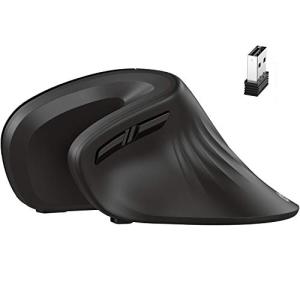
iClever Vertical Ergonomic Wireless Mouse with DPI Settings
Experience comfort and precision with a mouse designed to reduce strain and enhance your workflow
Product information
$29.99 $19.18
Product Review Score
4.62 out of 5 stars
36 reviewsProduct links
Optimizing Your Monitor Position
Getting your monitor position right is a game changer for your Ergonomic Desk Setup. It can save your neck, shoulders, and even your eyes from strain. So, let’s dive into how to optimize that monitor for a comfortable work environment.
Your monitor should be at eye level. If you find yourself looking down or craning your neck up, it’s time to make some adjustments. A good rule of thumb is to position your monitor so the top of the screen is at or just below your eye level. This way, your gaze naturally falls slightly downwards, which is way more comfortable.
Distance matters too. Aim for about an arm's length away. This distance helps reduce eye strain. If you’re squinting or leaning in closer, your monitor might be too far away. A little adjustment can make all the difference!
Consider angles as well. Your monitor should tilt slightly back, around 10 to 20 degrees. This angle helps you see the screen without tilting your head too much. Plus, if you spend long hours on the computer, a good monitor position can boost your overall comfort and productivity.
If you’re using multiple monitors, make sure they’re aligned. This reduces neck rotation when you shift your gaze from one screen to another. Keeping your setup clean and well-organized helps maintain focus, making your Ergonomic Desk Setup even more effective.

Ergonomic Wrist Rest Collection
Experience Comfort and Support During Long Work Hours with Our Ergonomic Wrist Rest Collection
Product information
Product Review Score
4.42 out of 5 stars
174 reviewsProduct links
Accessorize for Maximum Comfort
When it comes to creating the ultimate ergonomic desk setup, don’t forget about the little extras that can make a big difference in your comfort and productivity. Accessories can help you get the most out of your workspace, whether you’re tackling a mountain of emails or diving into a creative project.
One accessory that can completely change your experience is an ergonomic mouse. These are designed to fit your hand comfortably, reducing strain on your wrist and forearm. Pairing a good mouse with a supportive mouse pad can really boost your setup. Look for one that has wrist support to keep you in a healthy position throughout the day.
Keyboard choice is just as important. Consider a split keyboard, which keeps your hands in a natural position and helps prevent tension. Don’t underestimate the power of a good keyboard wrist pad, either. It’s simple but effective for reducing fatigue during those long typing sessions.
How about some good lighting? A well-lit workspace can relieve eye strain and keep you alert. An adjustable desk lamp gives you control over brightness, so you can set the perfect ambiance for your work. A little greenery can also liven up your desk and boost mood. A small plant can make your environment more inviting and improve air quality.
Finally, don’t forget about your chair setup. If you're using a standard chair, adding a lumbar support cushion can correct your posture and keep your back happy. Combine that with a footrest for more stability, and you’re on your way to a truly ergonomic desk setup. Small changes add up, so invest in the right accessories to create a workspace that feels just right.



