
Upgrading your chair can make a world of difference in your workspace. A good chair supports your back, keeps your posture in check, and lets you concentrate on your tasks without distractions. An ergonomic desk setup starts with a comfy seat, so it’s worth investing a little time into finding the right one.
Look for chairs that offer adjustable height and lumbar support. You want to sit at a height where your feet rest flat on the floor and your knees form a 90-degree angle. The lumbar support cradles your lower back, which can help prevent aches and pains during long hours of work.
Consider materials, too! Breathable mesh or cushioned fabric can keep you cool during those busy days. If you find yourself fidgeting in your chair, you might want to test out models with a swivel base and rolling wheels. They’ll let you glide effortlessly to grab that essential file or drink without straining.
Don’t forget about aesthetics! Choose a chair that fits your style and complements your office decor. After all, you spend a lot of time at your workstation, so it should feel like a place you enjoy being.
Arrange Your Monitor at Eye Level
Setting your monitor at eye level is one of the easiest tweaks you can make for a killer ergonomic desk setup. You don’t want to be craning your neck or squinting at the screen, right? That creates tension and can lead to headaches and discomfort. When your monitor is positioned just right, you’ll feel more relaxed and focused.
First, aim for the top of your screen to be at or slightly below eye level. This way, you can keep your head straight and avoid straining your neck. Not sure how to achieve that? Grab a monitor stand or some sturdy books to lift your screen to the perfect height. You can even invest in an adjustable monitor stand if you want to customize it later.
Make sure your monitor is about an arm’s length away from your eyes. This distance helps reduce eye strain, making it easier to stay concentrated on your work. If you’re still squinting, consider adding a blue light filter or an anti-glare screen protector for extra comfort.
Also, don’t forget about the angle. Tilt your monitor slightly back—about 10 to 20 degrees—so you’re looking down at it just a bit. This keeps your neck from bending awkwardly and gives your eyes a break. Once your monitor is set, you’ll be amazed at how quickly your workspace feels more comfortable, making your ergonomic desk setup feel like a breeze!

Ergonomic Mesh Office Chair with Adjustable Lumbar Support
Achieve Maximum Comfort and Productivity with Our Mesh Office Chair Featuring Customizable Lumbar Support
Product information
$199.99
Product Review Score
4.5 out of 5 stars
201 reviewsProduct links
Choose the Right Desk Accessories
Choosing the right desk accessories can make a big difference in your Ergonomic Desk Setup. When you have the right tools at your fingertips, you’ll feel more comfortable and productive. Let’s dive into some must-have accessories that can elevate your workspace.
First up, consider a monitor stand. Elevating your screen to eye level helps reduce neck strain and improves posture. It’s a simple fix that can prevent a lot of discomfort. You can find stylish options that also provide extra storage space underneath. Think about how nice it would be to have your essentials within reach!
Next, you’ll want to invest in a quality mouse pad, preferably with wrist support. A soft, cushioned surface can make a big difference when you’re working long hours. It helps keep your wrist in a neutral position and reduces fatigue. Small changes can lead to big improvements in comfort.
Don’t forget about organizing tools. A desk organizer can help keep your workspace tidy. Clutter can be distracting and stress-inducing. With a few compartments for pens, papers, and other essentials, you’ll have everything right where you need it.
Finally, a good chair cushion can take your Ergonomic Desk Setup to the next level. It provides extra support for your lower back, making those long hours at your desk feel a lot easier. Look for cushions that are breathable and easy to clean. You want something that enhances comfort without being a hassle to maintain!
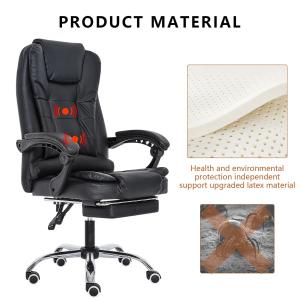
Ergonomic High-Back Executive Office Chair
Experience Comfort and Style with our Ergonomic High-Back Executive Office Chair
Product information
$112.49
Product Review Score
4.4 out of 5 stars
181 reviewsProduct links
Incorporate Movement into Your Day
Staying still for too long can be a real pain—literally! An ergonomic desk setup can do wonders for your productivity and health, but adding movement into your daily routine is equally important. It keeps your muscles happy and your mind sharp.
Try to stand up and stretch every hour. Simple stretches can relieve tension and make a huge difference in how you feel throughout the day. Find a few stretches that work for you, and set a timer so you don’t forget. If you can, step away from your desk and take a quick walk around your office or home. Moving your body can boost your energy levels and refresh your focus.
If you want to level up your ergonomic desk setup, consider a standing desk or a desk converter. These options let you switch between sitting and standing, making it easier to keep moving. You might find that changing positions every so often helps you feel more comfortable and invigorated.
Don’t forget about integrating movement into other parts of your day. Try walking meetings or taking phone calls while standing. Even simple adjustments, like parking farther away or using the stairs, can increase your daily movement without any extra effort. Little changes add up, and they can really enhance how you feel during long workdays.



